
When we talk about the USB 3.0 and USB 2.0 difference, most people first think of the speed increase—a leap from 480 Mbps to 5 Gbps. But as a wire harness engineer, I see not just a digital change in speed, but a fundamental revolution in the connector's internal physical structure. Why are USB 3.0 cables usually thicker and stiffer? Because their internal wiring has expanded from 4 cores to 9 cores, adding dedicated Shielded Differential Pairs (SDP). In this article, from the professional perspective of wire harness manufacturing and design, I will deeply deconstruct the core differences between USB 3.0 and 2.0 in physical appearance, pinout definitions, and functional roles, helping you understand the engineering secrets behind the blue connector.
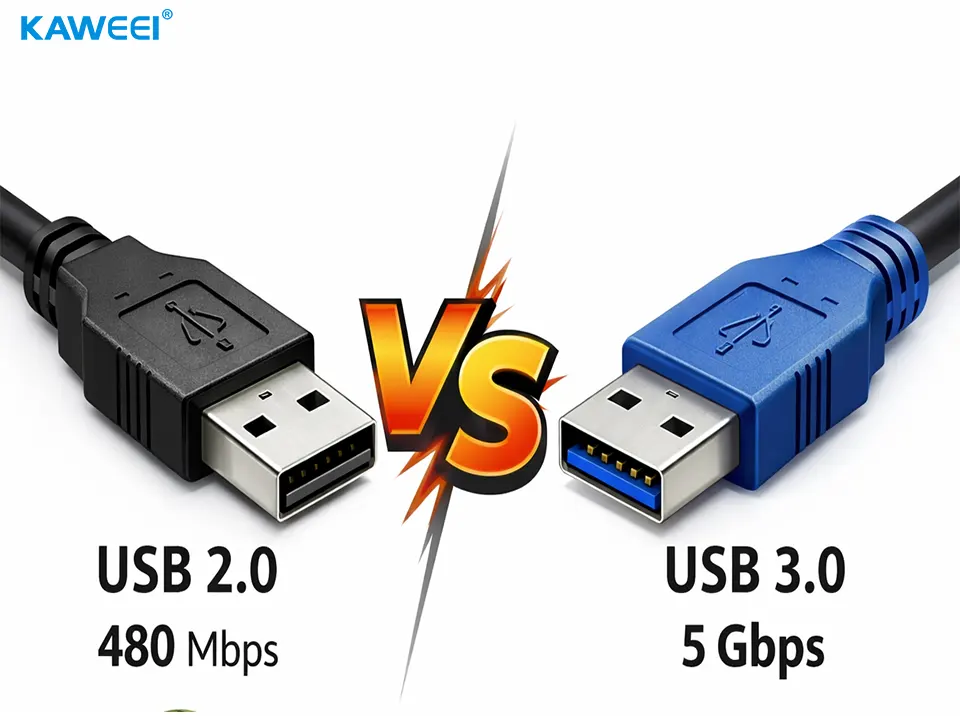
1. Main Differences Between USB 2.0 and USB 3.0
| Feature | USB 2.0 | USB 3.0 (USB 3.1 Gen 1 / 3.2 Gen 1) |
| Theoretical Speed | 480 Mbps (60 MB/s) | 5 Gbps (500 MB/s) |
| Actual Speed | ~30–40 MB/s | ~300–450 MB/s |
| USB 2.0 vs 3.0 Appearance | Usually Black or White | Usually Blue |
| Pinout Definition | 4 Pins | 9 Pins (4 legacy + 5 new) |
| Transmission Mode | Half-Duplex | Full-Duplex |
| Power Delivery | Approx. 500mA (2.5W) | Approx. 900mA (4.5W) |
2. Wiring Differences (Physical Structure)
This is the most intuitive hardware difference. Taking the most common USB Type-A (Rectangular Interface) as an example:
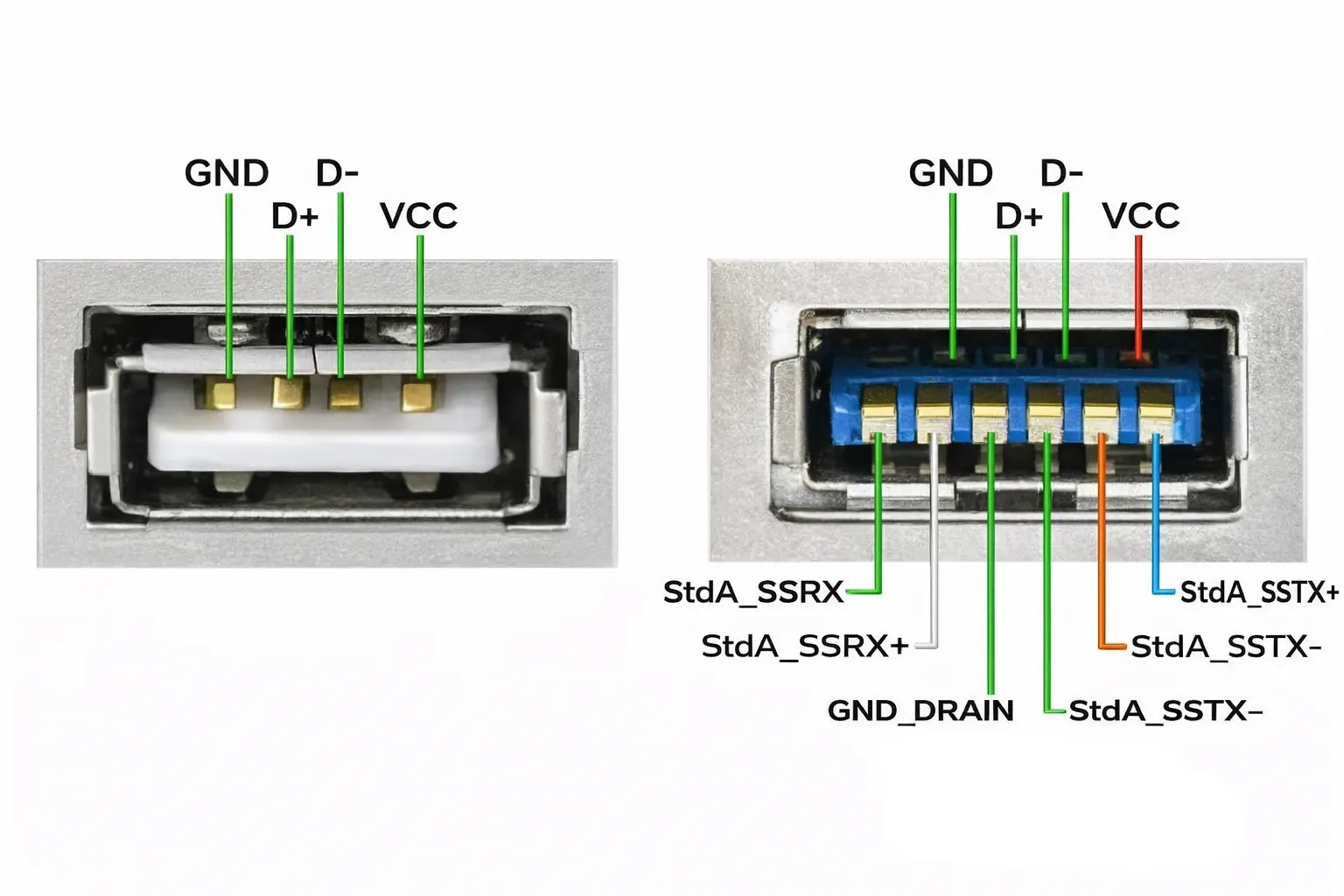
1. USB 2.0 Wiring (4 Wires)
USB 2.0 has only one row of 4 metal contacts.
-
VCC (+5V): Power Positive.
-
D- (Data -): Data Transmission Negative.
-
D+ (Data +): Data Transmission Positive.
-
GND: Ground.
Feature: Only one pair of data lines (D-/D+), data transmission and reception share this single channel.
2. USB 3.0 Wiring (9 Wires)
To maintain compatibility with 2.0, USB 3.0 retains the original 4 contacts and adds 5 new spring contacts behind (or deeper inside) them.
-
Front Row (2.0 Compatible): VCC, D-, D+, GND
-
Back Row (3.0 Dedicated):
-
StdA_SSRX-: SuperSpeed Receive Data Negative
-
StdA_SSRX+: SuperSpeed Receive Data Positive
-
GND_DRAIN: Signal Ground (Shielding Interference)
-
StdA_SSTX-: SuperSpeed Transmit Data Negative
-
StdA_SSTX+: SuperSpeed Transmit Data Positive
-
Feature: Adds two independent pairs of high-speed data channels (Tx Transmit Pair, Rx Receive Pair).
3. What is the Function of the Different Wiring? (Core Principle Analysis)
You might ask: “Why add those 5 extra wires? It's like expanding a single-lane road into a highway.”
1. Achieving "Full-Duplex" Communication — Doubling Efficiency
-
USB 2.0 (Half-Duplex): Only one pair of data lines (D+/D-). Like a Walkie-Talkie, when one person speaks, the other must listen; they cannot speak simultaneously. Data is either "reading" or "writing", not both.
-
USB 3.0 (Full-Duplex): In the new wiring, there are lines dedicated to Transmitting (Tx) and lines dedicated to Receiving (Rx). Like a Phone Call, both parties can speak at the same time.
-
Function: You can copy a file from the computer TO the USB drive while simultaneously READING another file from it, without interference, greatly improving the efficiency of mixed read/write operations.
-
2. Physical Level "Speed Boost" — Differential Signals
-
The newly added Tx and Rx lines in USB 3.0 are "SuperSpeed" channels designed specifically for high-frequency signals.
-
Function: They carry 5Gbps high-frequency signals, which the original D+/D- cannot withstand. Without these extra wires, the speed is locked at 480Mbps.
3. Perfect "Backward Compatibility"
-
Retaining the 4 wires of USB 2.0 is not for show, but for Compatibility.
-
Function: When you plug a USB 2.0 mouse into a USB 3.0 blue port, the 5 internal 3.0 pins "float" or do not work, only the front 4 pins make contact. The computer realizes: "Oh, this is an old device, I'll chat with it in 2.0 mode."
4. Stronger Power Supply and Shielding
-
The newly added GND_DRAIN ground wire is not just for grounding.
-
Function: Under high-frequency transmission, electromagnetic interference (EMI) is severe. This wire, combined with the shielding layer inside the cable, effectively reduces data errors and prevents interference with Wi-Fi or Bluetooth signals (this is why USB 3.0 devices sometimes interfere with 2.4G wireless mice). Also, more metal contacts allow for greater current (900mA), capable of driving large portable hard drives without external power.


