
A network cable is a physical connection that carries data between devices such as computers, routers, switches, servers and industrial equipment. Common types include twisted-pair copper cable, fiber optic cable and coaxial cable.
In everyday use, “network cable” often means a copper Ethernet cable with RJ45 plugs. Choosing one involves more than matching the connector: the cable category, total link length, shielding, installation environment and termination quality all affect whether it suits the application.
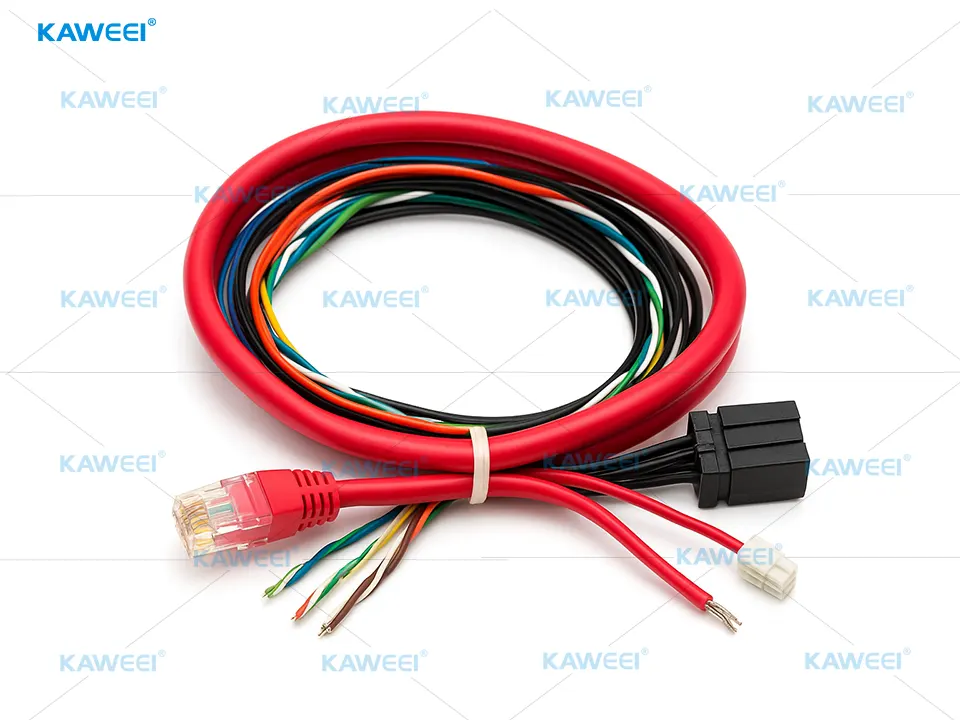
Example of a custom assembly incorporating an RJ45 connection and additional branches.
Network Cable vs. Ethernet Cable: What Is the Difference?
Network cable is a broad term for cabling used to connect network devices. Ethernet is a family of networking standards that can operate over different physical media, including copper and fiber.
The familiar “Ethernet cable” sold as a patch cord is usually a four-pair copper cable terminated with 8P8C modular plugs, commonly called RJ45 plugs. However, an RJ45-shaped connector alone does not establish the supported protocol, pin assignment or transmission performance. Check the equipment specification, especially for custom and industrial connections.
Main Types of Network Cables
Twisted-Pair Copper Cable
Twisted-pair cable uses insulated copper conductors arranged in pairs. Twisting, together with balanced signaling, helps reduce interference and crosstalk. Many common Ethernet connections use four pairs, or eight conductors, within an outer jacket.
Cat5e, Cat6 and Cat6A are familiar categories of copper cabling. They are used for office networks, equipment connections, wireless access points and other Ethernet applications. Suitable copper connections can also carry power using Power over Ethernet, or PoE.
Fiber Optic Cable
Fiber optic cable carries data as light through optical fibers. It is useful for building backbones, longer links and environments where electromagnetic interference is a concern.
Its supported speed and distance depend on the fiber type, optical transceivers, connectors and link loss. Optical fiber itself does not carry PoE electrical power, so remote equipment may need a separate power arrangement.
Coaxial Cable
Coaxial cable has a central conductor, dielectric insulation, a conductive shield and an outer jacket. It is widely used for cable broadband and television distribution.
It serves a different interface from a conventional RJ45 Ethernet patch cord. Choose the medium supported by the equipment and network architecture.
Cat5e vs. Cat6 vs. Cat6A
Start with the speed required by the devices and the distance between them. A higher category does not automatically make an existing internet connection faster.
| Cable category | Common Ethernet application | Distance considerations | Selection guidance |
|---|---|---|---|
| Cat5e | 1 Gigabit Ethernet; suitable installations can also support 2.5GBASE-T | A compliant 1GbE channel can extend to 100 m; higher-speed applications require appropriate equipment and link conditions | Suitable for many existing office and equipment networks |
| Cat6 | 1GbE and multi-gigabit connections; 10GBASE-T over shorter links | 1GbE can operate over a compliant 100 m channel. For 10GbE, up to 55 m may be achievable under suitable conditions; some installations require shorter reach because of interference from adjacent cables, known as alien crosstalk | Consider where greater cabling performance is useful, but confirm the intended speed and reach |
| Cat6A | 10 Gigabit Ethernet | Designed to support 10GBASE-T over a compliant channel up to 100 m | A practical option when 10GbE is required across the full standard channel length |
The 100 m channel commonly includes a permanent link and connecting cords. It is not a blanket rating for any 100 m flexible patch cable. Cord construction, conductor size, temperature and the connection layout can affect the permitted design.
Also distinguish cable bandwidth, expressed in MHz, from Ethernet data rate, expressed in Mbps or Gbps. They describe different properties and should not be used interchangeably.
trueCABLE’s guide to network cable types and categories explains the main categories and their typical applications. The IEEE 802.3bz project provides the standards background for 2.5GBASE-T and 5GBASE-T; Cat5e should not be treated as having an absolute 1Gbps ceiling.
How to Choose a Network Cable
1. Match the Cable to the Equipment
Check the port speed, connector interface and supported network standard at both ends. A 1Gbps switch port remains a 1Gbps interface when connected with Cat6A. Internet performance also depends on the service plan, router, network traffic and remote server.
For a custom interface, confirm the pin assignment rather than assuming that matching connector shapes mean matching connections.
2. Plan the Complete Cable Route
Measure the installed route, including bends, service loops, cabinet entry points and patch connections. Allow for installation access without creating unnecessary coils or strain at the connectors.
If the required reach exceeds the supported copper channel, review fiber or an appropriate network extension design. A longer piece of copper cable does not remove the link’s distance limit.
3. Select Shielding for the Environment
Cable category and shielding are separate choices. Cat6 and Cat6A are available in different constructions; a category label alone does not tell you whether a cable is shielded.
Common designations include:
- U/UTP: no overall shield and no individual pair shields.
- F/UTP: an overall foil shield around unshielded twisted pairs.
- S/FTP: an overall braided screen with individually foil-shielded pairs.
An ordinary protective jacket should not be confused with a conductive EMI shield. In locations near motors, drives or other interference sources, assess the complete shielding, connector and bonding arrangement. Shielding performance depends on correct installation as well as cable construction.
The illustrated guide to Ethernet cable shielding types shows how the foil and braid arrangements differ.
This custom Cat6 shielded Ethernet patch cable is one example of a shielded RJ45 assembly.
4. Check Movement and Jacket Requirements
Solid-conductor cable is commonly used for fixed structured cabling. Stranded-conductor cable is commonly used for flexible patch connections. Repeated machine movement requires a cable specifically designed for the required flexing or torsion conditions; an ordinary stranded patch cord is not automatically suitable for continuous motion.
Confirm temperature, abrasion, oil, moisture, UV exposure and applicable fire requirements against the actual cable specification. An indoor jacket, outdoor jacket and continuous-flex construction solve different problems.
5. Include PoE Requirements
For a PoE camera, access point or other powered device, specify both data and power needs. Conductor resistance, wire size, connector suitability, ambient temperature and cable bundling all need consideration.
Avoid choosing a cable solely because it carries a category label. Confirm the cable material and construction, the required PoE type and the installation conditions.
When Does a Custom Network Cable Assembly Make Sense?
A standard patch cord is often sufficient when its length, connectors and environmental rating fit the installation. Customization becomes useful when the equipment requires a defined combination of interfaces, routing and protection.
Typical requirements include a specific length tolerance, angled connector, panel interface, branch position, strain relief or identification label. These should be defined during wire harness and cable routing design. A custom assembly may also combine network and other circuits, provided the design preserves the required electrical separation and transmission characteristics.
For example, a cable routed inside a control cabinet may need an RJ45 connection at one end, an equipment-specific interface at the other, and a defined branch location to clear adjacent components. The drawing should identify each circuit and termination. An RJ45 connection should not be assumed to make every branch an Ethernet connection.
An Ethernet connection can also form part of a larger communications assembly, as shown in the telecom wire harness application overview. Sunweei’s comparison of wire harnesses and cable assemblies explains the overlapping terminology.
What Should Be Tested?
Define acceptance requirements before ordering. Different tests answer different questions:
- Visual and dimensional inspection: checks items such as workmanship, connector orientation, length and branch positions against the drawing.
- Wire-map and continuity testing: checks connections and can identify faults such as opens, shorts or incorrect pin assignments, depending on the tester.
- Transmission performance testing: evaluates the relevant parameters for the specified cable, patch cord, permanent link or channel. These can include insertion loss, return loss and crosstalk.
- Application verification: checks operation with the intended equipment and operating conditions where required.
Passing a continuity test alone does not prove Cat6 or Cat6A transmission performance. Likewise, a category marking on bulk cable does not establish the performance of a finished custom assembly. The connector, termination method and assembly construction also matter.
Before production, agree on what will be tested, the test method, acceptance limits and report format. The report should identify the cable or assembly tested so the results can be checked against the order requirements.
To discuss a custom network cable assembly, send your drawing and requirements to Kaweei. Cable construction, interfaces and verification scope can then be reviewed against the intended application.


